

묻고답하기
스케치북 게시판에서 댓글 쓰기 권한이 없을경우 댓글쓰기창 아예 안뜨게 할 수 없을까요?
2014.05.15 00:57
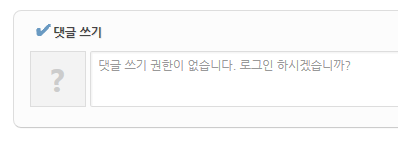
권한이 없으면 이거 아예 안뜨게 할 수 없을까요?
댓글 3
-
#혼마 메이코
2014.05.15 02:42
-
CoffeeMix
2014.05.15 12:12
감사합니다!
알려주신방법대로 하면 댓글쓰기폼 뿐만아니라 아래에 댓글달아 놓은것들도 다 안나오더군요. 그래서 댓글 쓰기폼이 있는곳에 코드를 추가해주니까 댓글쓰기 폼만 딱 없어졌습니다 ㅎㅎ
-
혼마_메이코
2014.05.15 12:14
잘 해결되었다니 기쁘네요! 앞으로도 좋은 사이트 꾸려나가시기를 바랍니다 :}

스캐치북 스킨 ._read.html 파일의 290번 라인 (r21기준)부터 시작되는 이부분
<div cond="!$mi->viewer_cmt" class="fdb_lst_wrp {$mi->fdb_style} {$mi->profile_img}">
		<div id="{$oDocument->document_srl}_comment" class="fdb_lst clear {$mi->fdb_nav} {$mi->cmt_wrt_position}">
			<!--// Editor -->
			<!--@if($mi->cmt_wrt=='sns')-->
			<!--// SocialXE -->
			<div cond="$oDocument->allowComment() && $mi->select_editor!='N'" class="editor_select bubble fr m_no" title="{$lang->noti_rfsh}">
				<a class="tg_btn2" href="#" data-href="#editor_select"><b class="tx_ico_circ bg_color"><i class="ie8_only color">●</i><b>?</b></b> {$lang->select_editor}</a>
				<div cond="$rd_idx==0" id="editor_select" class="editor_select_cnt tg_cnt2 wrp"><button type="button" class="tg_blur2"></button>
					<a class="on"|cond="$mi->cmt_wrt=='simple'" href="#" onclick="jQuery.cookie('bd_editor','simple');location.reload();return false"><em>✔ </em>{$lang->textarea}</a>
					<a class="on"|cond="$mi->cmt_wrt=='editor'" href="#" onclick="jQuery.cookie('bd_editor','editor');location.reload();return false"><em>✔ </em>{$lang->wysiwyg}</a>
					<a class="on"|cond="$mi->cmt_wrt=='sns'" href="#" onclick="jQuery.cookie('bd_editor','sns');location.reload();return false"><em>✔ </em>{$lang->sxc_editor}</a>
					<i class="edge"></i><button type="button" class="tg_blur2"></button>
					<!--// ie8; --><i class="ie8_only bl"></i><i class="ie8_only br"></i>
				</div>
			</div>
			<img class="zbxe_widget_output" widget="socialxe_comment" skin="sketchbook5" colorset="{$mi->colorset}" document_srl="{$oDocument->document_srl}" content_link="{getFullUrl('','document_srl',$oDocument->document_srl,'dummy','1')}" content_title="{htmlspecialchars($oDocument->getTitleText())}" enter_send="N" auto_view_sub="Y"|cond="!$mi->auto_view_sub" style="overflow:visible" />
			<!--@else-->
			<!--// Comment Write : Top -->
			<include cond="$oDocument->allowComment() && !$mi->cmt_wrt_position" target="_comment_write.html" />
			<!--// Comment List -->
			<div id="cmtPosition" aria-live="polite"><include target="_comment.html" /></div>
			<!--// Comment Write : Bottom -->
			<include cond="$oDocument->allowComment() && $mi->cmt_wrt_position=='cmt_wrt_btm'" target="_comment_write.html" />
			<!--@end-->
		</div>
	</div>
이 코드의 맨 위에 <!--@if($logged_info)-->
맨 아래에 <!--@end--> 추가해주시면 될 듯 합니다.
아니면
<div cond="!$mi->viewer_cmt" class="fdb_lst_wrp {$mi->fdb_style} {$mi->profile_img}">
를
<div cond="!$mi->viewer_cmt && $logged_info" class="fdb_lst_wrp {$mi->fdb_style} {$mi->profile_img}">
처럼 변경해보세요