묻고답하기
에디터창에서 HTML편집기에서 CSS코드를 주면
2014.02.18 15:36
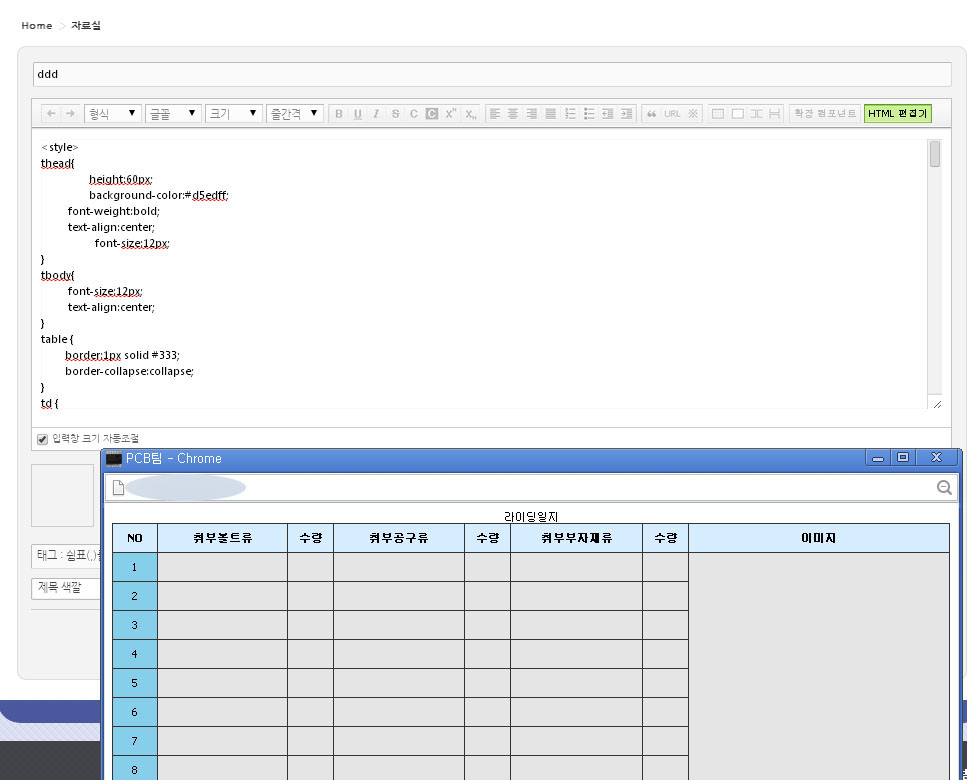
위와같이 에디터창에서 HTML편집기에서 CSS코드를 줘서 [미리보기]하면 잘보이는데
[등록]하면
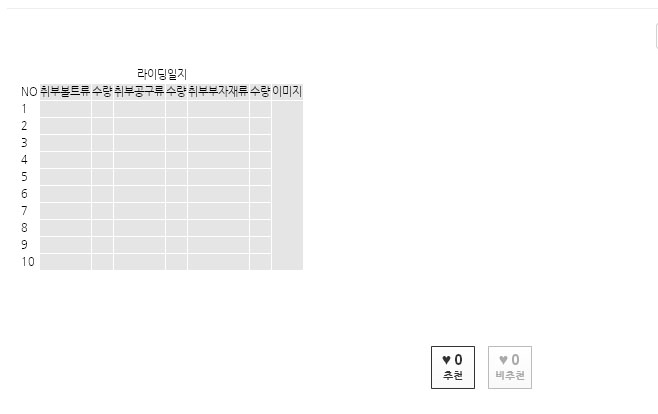
이렇게나오면서 다시 [수정]에 들어가면 <style> </style> 부분은 다 없어져 버리네요
글작성할때 css코드는 사용못하나요?


2014.02.18 15:36
위와같이 에디터창에서 HTML편집기에서 CSS코드를 줘서 [미리보기]하면 잘보이는데
[등록]하면
이렇게나오면서 다시 [수정]에 들어가면 <style> </style> 부분은 다 없어져 버리네요
글작성할때 css코드는 사용못하나요?


<meta charset="UTF-8" />
  <meta name="Generator" content="EditPlus®" />
  <meta name="Author" content="" />
  <meta name="Keywords" content="" />
  <meta name="Description" content="" />
  <title>Document</title>
 <head>
<style>
thead{
height:60px;
background-color:#d5edff;
         font-weight:bold;
         text-align:center;
  font-size:12px;
}
tbody{
         font-size:12px;
         text-align:center;
}
table {
border:1px solid #333;
border-collapse:collapse;
}
td {

height:30px;
border:1px solid #333;
}
.frist{
width:50px;
 text-align:center;
}
.txt1{
width:150px;
text-align:center;
}
.txt2{
width:50px;
  text-align:center;
}
.txt3{
width:300px;
text-align:center;
}
</style>
 </head>

<article>
<table>
<caption>라이딩일지</caption>
<colgroup><col style="background:skyblue;" />
</colgroup><colgroup span="12" style="background:#e5e5e5;"></colgroup>
<thead>
<tr>
<td class="frist">NO</td><!--제목-->
<td class="txt1">취부볼트류</td><!--취부볼트류-->
<td class="txt2">수량</td><!--수량-->
<td class="txt1">취부공구류</td><!--취부공구류-->
<td class="txt2">수량</td><!--수량-->
<td class="txt1">취부부자재류</td><!--취부부자재류-->
<td class="txt2">수량</td><!--수량-->
<td class="txt3">이미지</td><!--이미지-->
</tr>
</thead>
<tbody>
<tr>
<td class="frist">1</td><!--제목-->
<td class="txt1"></td><!--취부볼트류-->
<td class="txt2"></td><!--수량-->
<td class="txt1"></td><!--취부공구류-->
<td class="txt2"></td><!--수량-->
<td class="txt1"></td><!--취부부자재류-->
<td class="txt2"></td><!--수량-->
<td class="txt3" rowspan="10"></td><!--이미지-->
</tr>
</tbody></table>
    </article>